Transform Your Solar Investment With Automated Energy Management
Potentially save hundreds monthly by intelligently storing solar energy, charging when electricity is cheapest, and exporting when it delivers the greatest value.
Energy Manager is a self-managed energy optimisation system designed to run on a dedicated Home Assistant instance, supporting Sungrow, Sigenergy, AlphaESS, GoodWe, Fronius, and SolarEdge inverters and batteries.
Potential Monthly Savings
(During price spikes)
Automated Decision Logic
Pre-configured Baseline
No joining fee
Pick the approach that matches your electricity plan
Flow Power, Globird and DIY electricity plans are supported as retail-optimised plans and behave differently (by design). Most electricity providers can be supported by creating a plan that reflects their offered import and export rates and time periods. Free features apply to Amber Electric / LocalVolts only.
Wholesale-exposed trading
Amber Electric & LocalVolts
- Designed for dynamic plans where "buy low / sell high" strategies can make sense.
- Free tier: basic monitoring + negative feed-in price curtailing (device dependent).
- Premium: automated optimisation and configurable strategies.
Retail bill optimisation
Flow Power, Globird & DIY Plans
- Optimises for PEA outcomes and monthly bill reduction.
- Charges the battery at the cheapest (configurable) price and exports during the Happy Hour (5:30–7:30pm) window.
- Uses AEMO wholesale pricing on Energy Manager servers — no retailer API setup required.
- Optimises for Free Buy and Super Sell periods.
- Charges the battery during the cheapest periods and exports during the Super Sell period (configurable).
- No retailer API setup required..
- Supports most electricity providers by letting you create your own electricity plan.
- Configure the import, free-energy and export periods, rates and applicable export limits offered by your retailer.
- No retailer API setup required.
Flow Power
Globird
DIY / Other Plans
Intelligent Energy Management
Our system automatically optimises your solar and battery usage to reduce your power bill—using provider-specific logic for wholesale-exposed plans and provider-specific or user-configured logic for retail-optimised plans.
Pricing Optimisation
Tariff-aware automation that optimises charge/discharge/export behaviour based on your plan rules—wholesale-exposed trading (Amber/LocalVolts), provider-specific retail optimisation (Flow Power & Globird), or a DIY plan configured for your retailer.
Automated Battery Control
Automates charge/discharge setpoints using your chosen strategy, pricing signals, and forecasts—while keeping the underlying decisions visible so you can verify and adjust behaviour.
Smart Solar Forecasting
Energy Manager relies on solar and weather forecast data from Solcast and BOM to predict solar generation and optimise battery charging schedules.
Comprehensive Dashboard
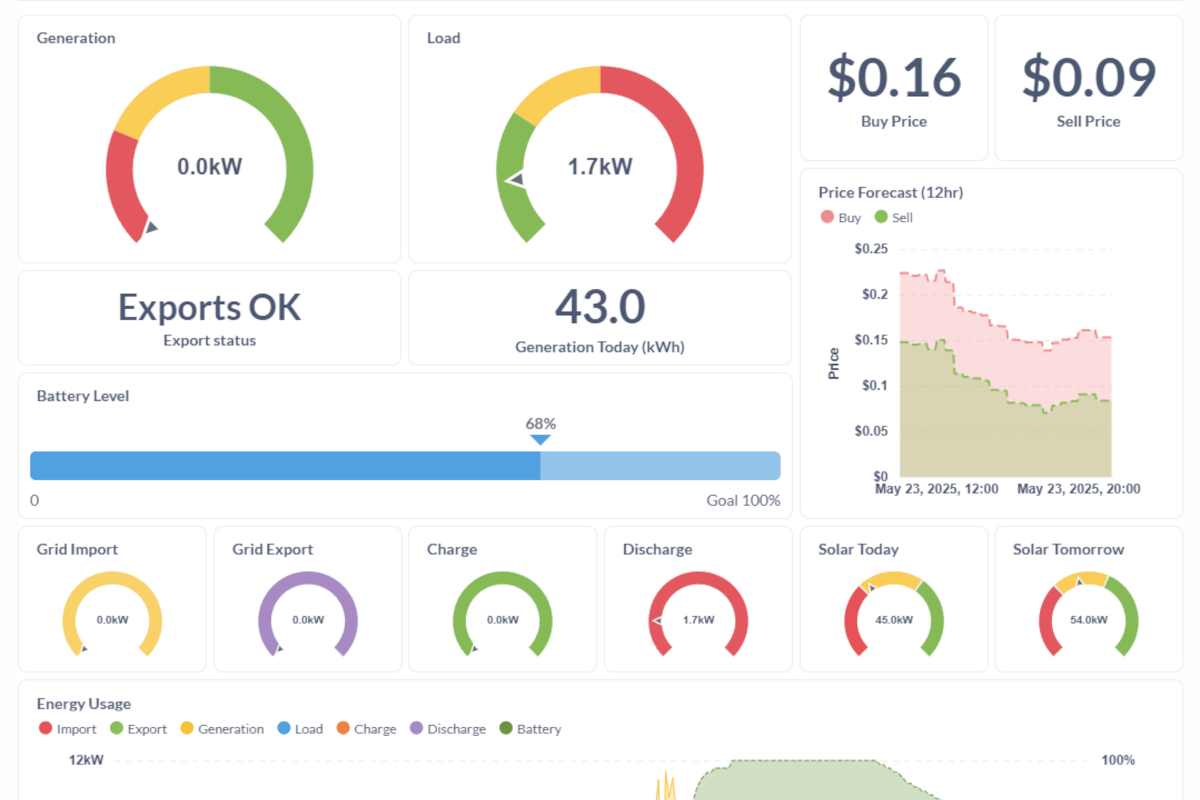
Dashboards and metrics to monitor system state, pricing, forecasts, and outcomes—so you can verify behaviour and spot issues early.
How It Works
Deploy reliably using a structured setup flow designed for dedicated Home Assistant installations.
Create an Account
Sign up for your Energy Manager account and API key, plus obtain any required pricing integration keys (Amber Electric / LocalVolts only) and Solcast. Flow Power, Globird and DIY plans do not require a retailer API; DIY plans use the rates and time periods you configure from your retailer’s offer. This is a self-managed system and assumes you are comfortable configuring integrations.
Download & Install
Download our pre-configured Home Assistant backup and restore it to a clean, dedicated Home Assistant OS installation (not an existing setup). We recommend Raspberry Pi 5, Intel NUC, a Home Assistant Green or Yellow, or an old laptop.
Start Managing
After your settings have been configured, use the free version (Amber Electric / LocalVolts) to track pricing, curtail excess solar during negative feed-in pricing (device dependent), and manually control supported devices. Premium adds automated optimisation features. Flow Power, Globird and DIY electricity plans are Premium-only (30-day free trial).
Upgrade to Premium
Upgrade for a small monthly fee to enable advanced optimisation and automated decision logic, based on your configuration and device capabilities.
Simple, Transparent Pricing
Amber Electric and LocalVolts can start on the free tier (monitoring + curtailing).
Flow Power, Globird and DIY electricity plans are Premium-only, starting with a 30-day free trial.
Free Plan
AMBER ELECTRIC & LOCALVOLTS ONLY
- Pre-configured dedicated Home Assistant baseline
- Negative feed-in price curtailing (Amber Electric / LocalVolts only, device dependent)
- Comprehensive energy dashboards
- Current buy/sell pricing display
- Solar generation & consumption metrics
- Battery level monitoring
- Pricing forecast & history
- Solar generation forecasts
- Weather forecasts
- Manual control capabilities
Premium Plan
per month
- Everything in Free Plan, plus:
- Automated energy trading
- Smart buy/sell based on price fluctuations
- Price spike anticipation & preparation
- Multiple configurable buy/sell strategies
- Forced charge during negative buy pricing
- Demand period management
- Hourly energy availability scores for deferred loads
- Hourly potential profit scores for deferred loads
Premium Plan
per month
- Retail and DIY plan optimisation (Premium-only)
- Create a DIY electricity plan for most providers using your retailer’s offered rates and time periods
- Happy Hour exporting (5:30–7:30pm) at higher FiT (configurable & optional) - Flow Power
- Super Sell exporting (6:00–8:00pm) at higher FiT (configurable &) - Globird
- Free Buy importing (11:00am–2:00pm) (configurable & optional) - Flow Power
- Cheapest-price battery charging (configurable threshold)
- AEMO wholesale pricing handled on Energy Manager servers (no retailer API) - Flow Power
- Weather-aware behaviour (BOM + Solcast forecasts)
- Automatic curtailing during negative FiT to protect PEA (optional) - Flow Power
- Optional stopping or reducing exports during bad weather to conserve battery
Frequently Asked Questions
A dedicated Home Assistant OS installation is required, running on supported hardware such as Home Assistant Green, Yellow, Raspberry Pi, or an equivalent system.
It is crucial that your inverter model is supported by Energy Manager and that it includes a Smart Meter for accurate power monitoring and reporting, if not built into the inverter already. For example, Sungrow inverters require the DTSU666, or similar Smart Meter, or else accurate energy readings are not possible.
If your hardware is not listed above, Energy Manager is not compatible.
Energy Manager is designed to run on a dedicated Home Assistant OS installation that operates continuously and is accessed via a web interface.
A pre-configured Home Assistant backup is provided, which you restore onto a clean, dedicated Home Assistant OS installation. Restoring this backup will overwrite any existing data on that device.
- Amber Electric / LocalVolts: wholesale-exposed dynamic pricing (supports free tier monitoring + curtailing, with Premium unlocking automation and optimisation).
- Flow Power & Globird: retail-optimised bill reduction using AEMO wholesale pricing on Energy Manager servers (Premium-only, 30-day free trial).
- Most other electricity providers: create a DIY plan using the import, free-energy and export periods, rates and applicable export limits offered by your retailer (Premium-only, 30-day free trial).
Energy Manager requires exclusive control to function correctly.
The free plan can still save you money by automatically curtailing your excess energy if export prices are negative (Amber Electric / LocalVolts only, device dependent).
Flow Power, Globird and DIY electricity plans are Premium-only (includes a 30-day free trial) because the value comes from the full optimisation package, not a single standalone feature.
Running Energy Manager within an existing Home Assistant setup that contains other integrations or automations is not supported, as it can cause conflicts and unpredictable behaviour.
If one server becomes unavailable, automatic routing to another server should occur.
Energy Manager is a self-managed system and assumes users are comfortable reviewing logs, configuration, and system behaviour independently.
Premium users can submit support tickets for confirmed issues related to Energy Manager functionality.
Community based support is available in our Discord server.
Ready to Transform Your Energy Management?
Join other Australian households already saving money with automated energy trading.
You can read detailed instructions through the documents page without even joining so you can see what is involved before committing anything.