Exclusion Period
There may be times when you want to disable energy management so that you can control it yourself.
The Exclusion Period setting on the PV Configuration page allows you to set a period of time when Energy Manager will change to a mode that will allow you to draw power from the grid, without reverting back to Self-Consumption mode every 5 minutes, and with minimal power draw from the battery.
What does the exclusion period do?
The exclusion period will put the system in "take from grid" mode. This will mean that your battery is set to NOT discharge, but any power draw from the house, including charging your EV, will come straight from the grid.
Setting the exclusion Period
Open the PV Configuration page (cog symbol).
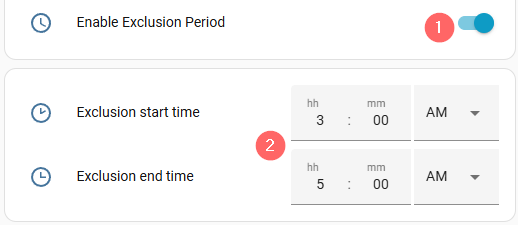
- Enable the Exclusion period toggle
- The exclusion period start and end times will be displayed. Edit these appropriately.
Don't mix up the Exclusion Period Toggle, located on the PV Dashboard Settings page, with disabling energy control which is located on the main PV Dashboard page.
The Exclusion period will still have Energy Manager server communications but will stop your battery from discharging (hence taking from the grid, perhaps for an EV Charger that is not support by our EV Charging module).
The Energy Control disable will stop all Energy Manager server communications and stay with the last instruction issued to it from the Energy Manager servers. You can then do whatever you want without Energy Manager making any decisions, with no Energy Manager control.
You can go directly to the other sections of this configuration page below: