Ocular IQ Home Solar configuration example
This quick guide is an example of how you may need to configure your EV Charger to remove any "smarts" from them so that Energy Manager has sole control. This page is specific to the Ocular IQ Home Solar EV charger, and other brands and models will be different.
Installer login
Obtain the installer login from your electrician (or get them to perform this work for you).
1 - Browse the the webpage of the EV charger, and enter the credentials (username "install", password potentially "Evcharging123")
2 - From the side menu, select Server. You will be presented with the following:
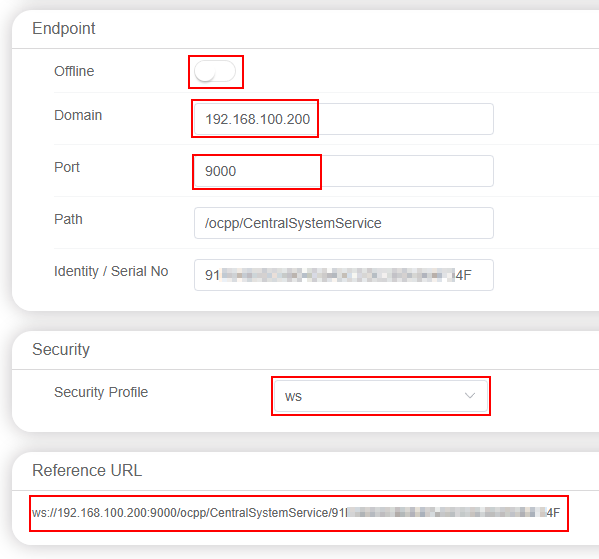
- Ensure that Offline is NOT enabled
- Enter the IP of Energy Manager in the Domain field
- Enter the port of 9000
- Keep the Path and Identity how they are
- Changed the Security Profile to ws
3 - Once the settings have been updated, select Submit from the top right and then reboot

4 - Once restarted, click on Balance and change mode to N/A.
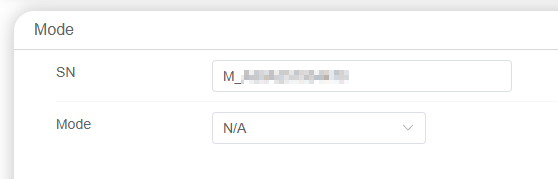
5 - Restart the charger once more
This is configuring the charger to be "dumb", since if you do not, many rejects will be issued when Energy Manager tries to control it and charging will fail.