Energy Manager Settings
These instructions are specifically for Globird customers. Please refer to the Amber Electric & LocalVolts settings for Amber Electric & LocalVolts customers, or Flow Power settings for Flow Power customers.
The settings that have come with the Energy Manager backup restoration may or may not be suitable for you. Whether they will be suitable for you will completely depend on your solar generation, your battery storage capacity, and your power consumption patterns.
Start with these defaults, but pay attention to how Energy Manager works for the first few weeks, as you will most likely have to tweak them to suit you. It will learn your power consumption pattern over time, and should have a good idea of your typical usage pattern over the first couple of weeks. The usage pattern will adjust along with your changed patterns during different seasons.
Energy Manager Settings Page
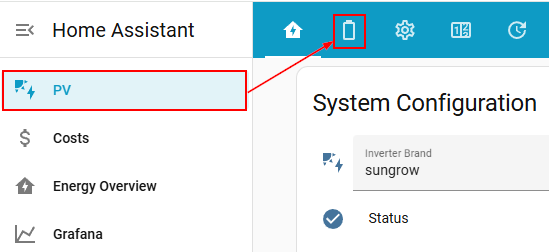
Select the PV menu on the left menu. Then click on the battery icon on the top tab.
Globird Configuration
The are a few configuration settings that you should familiarise yourself with. Generally these will be a "Set-and-forget", but you may want to change them on occassion.
Super Export (Sell)
When the Super Sell period comes, if you have more energy stored than you require to get you through the night, it could be a good idea to export what you don't need and earn some money from it. Note that if you can't get through the night on your stored power, it would always be better not to sell because it would cost more to take from the grid again later.
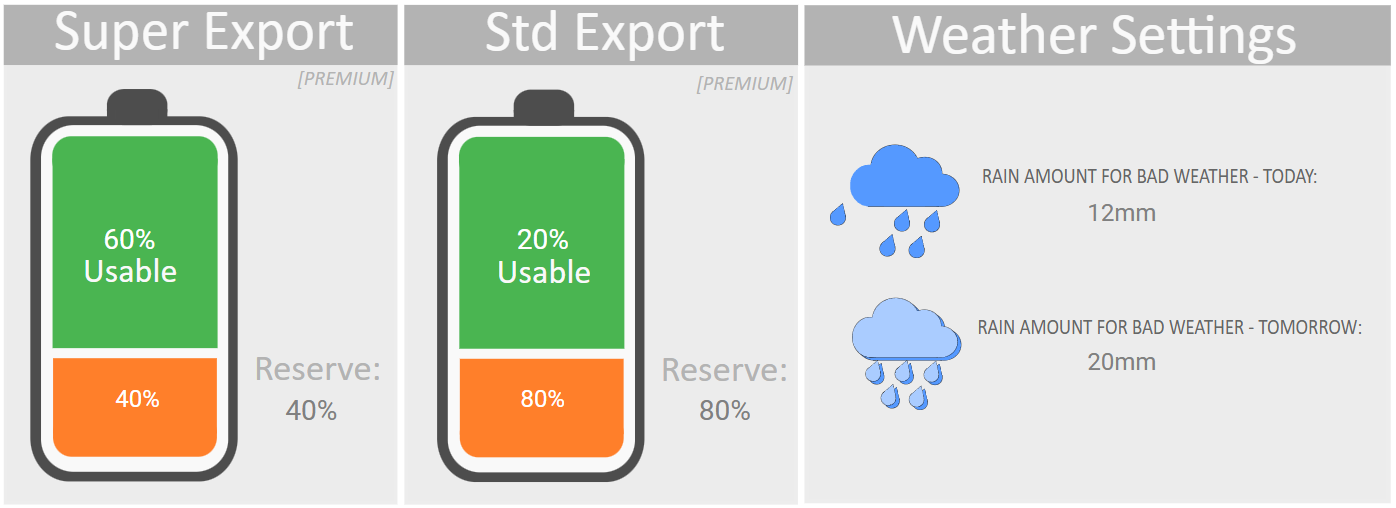
That being said, if you want to export during the Super Sell period, you can set how much of your battery you would like to export during this period. This ensures that you keep enough for yourself.
Note that on the main PV dashboard there are three other settings that will go along with this, which you should familiarise yourself with. These are:
- Super Period Max Export kWh - Set the limit in kWh of how much export you are allowed at the higher price. Generally this will be limited to 10kWh. Once you have exported this much, even during the Super Sell period, Energy Manager will stop your exports (unless you have Standard Sell period enabled to export during as well, since the Super Sell reverts to Standard Sell once your allocated export allowance has been used up). Even if you set your allowed Super Export setting above (in screenshot) to allow export of all your energy, the export will stop earlier once your allowed energy allowance has been used up.
- Super Period Export kW percentage - you can reduce how quickly your energy is allowed to be exported during the period.
- Allow Super Period Export - you will need to enable this option to export during the Super Sell period.
In the example above, if enabled, Energy Manager will export during the Super Sell period until the battery SOC hits 40% (or your allowed export kWh has been exhausted).
Standard Export
The Standard Sell period doesn't offer as high export prices as the Super Sell period, but you can also export during this period if you have surplus energy. Just like the Super Sell battery item in the chart, setting this will configure what percentage of your battery you are willing to export (this is the SOC level - so when, as per the example here, 80% SOC is reached, the battery will not export).
Notes:
- To export during the Standard Sell period you will need to enable it via Allow Standard Period Export on the main PV Dashboard settings page.
- You have the option to enable Standard Sell period exports, but limit it to excess solar only. To enable this, enable both Allow Standard Period Export and Only Export Excess Solar on the main PV Dashboard Settings page.
Weather Settings
It is often beneficial to restrict your energy export in bad weather, to keep it for yourself in case of power outages, and also because it may be more difficult to charge up your battery from the sun.
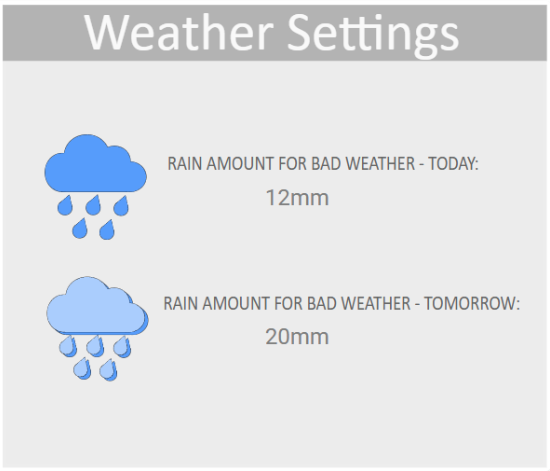
When there is bad weather, Energy Manager will be put into Bad Weather Mode. Bad weather is defined by two things:
- If the word "storm" is contained in your local BOM weather report right now
- If either of the Rain amount for bad weather - today or Rain amount for bad weather - tomorrow limits are exceeded. You can define both of these limits simply by clicking on them and entering how many mm of rain you would consider to warrant bad weather.
The setting Globird Bad Weather Max Export Percentage on the main PV Dashboard Settings page allows you to define how much, if any, to restrict export if bad weather has been detected.
You can go directly to the other sections of this configuration page below: